
Web UI
The Web UI lets you quickly set up and manage your CData Virtuality installation. In this section, we will describe each element of the interface and how you can get the most out of them; this page gives a short overview of each element and links to more detailed descriptions.
This is how the main page of the Web UI looks:
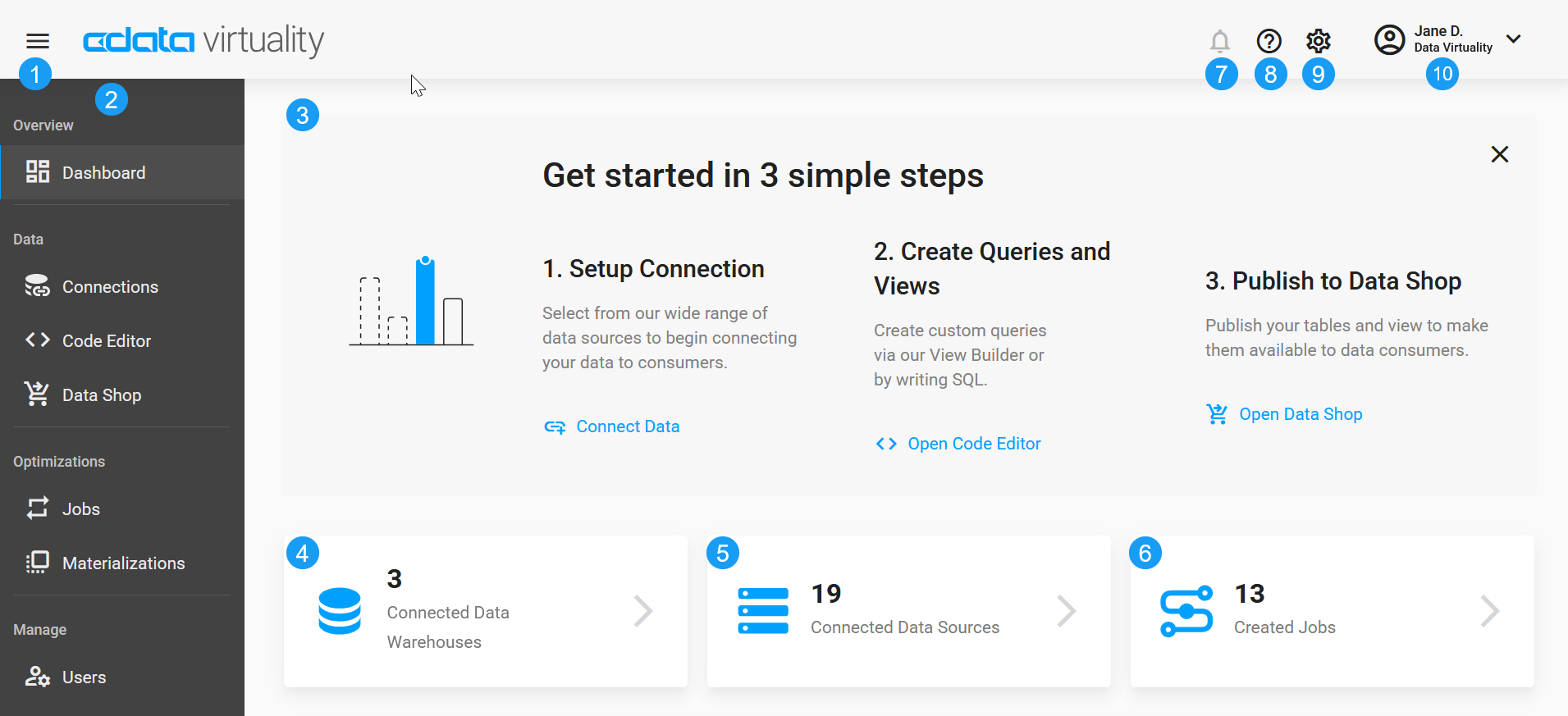
No. | Decription |
|---|---|
1 | Sandwich button to compact/expand the left-hand menu (expanded by default) |
2 | The left-hand menu providing easy access to the Dashboard, Data (Connections, Code Editor, Data Shop), Optimizations (Jobs, Materializations), and Manage (Users). Please find a detailed description below this table |
3 | Quick setup wizard (expanded by default, can be closed by clicking the X button in the upper right corner) |
4 | The number of connected data warehouses (clickable button) |
5 | The number of connected data sources (clickable button) |
6 | The number of created jobs (clickable button) |
7 | Notifications, if any |
8 | Links to the Documentation and Help Center |
9 | Link to Settings/Preferences |
10 | Account information and available actions:
|
The left-hand menu gives easy access to the following pages:
Dashboard
The Dashboard gives an overview of your CData Virtuality installation and its status and also provides a log of all runs with an easy way to view only failed runs if needed. Please find a detailed description here.
Data
Connections
This page displays all data warehouses and all sources connected to your CData Virtuality installation and their status. You can manage the data warehouses and sources you have already added and add new ones here. This page is described in more detail here.
Code Editor
The Code Editor lets you write and run SQL queries, as well as build CSV and XML/JSON queries. For more information, see here.
Data Shop
This page displays published data products which you can then access and download. For a detailed description, see here.
Optimizations
Jobs
This tab displays the jobs running on your CData Virtuality instance and gives quick access to detailed information about them, adding new jobs, and editing existing ones. Schedules for the jobs can also be managed from this page. You can find more information here.
Materializations
In some cases, queries may be sped up - CData Virtuality has a specially designed system for recommending optimizations. As you use it, recommendations will be shown in this tab which is described in more detail here.
Manage
Users
This page displays list of all users in the instance and allows to manage both users and roles, including inviting users and creating roles. More information is available here.